Record and edit digital audio
SndSampler is an amazing, trial version software only available for Mac, that belongs to the category Audio & Video with subcategory Editors & Managers and has been created by Sndsampler.
Top Recommended Alternative
More about SndSampler
Since we added this program to our catalog in 2007, it has obtained 3,023 downloads, and last week it gained 0 downloads.
Its current version is 6.2 and its last update was on 5/12/2009. This software is available for users with the operating system Mac OS (68k/PPC) and former versions, and it is available in English.
About the download, SndSampler is a program that needs less storage space than most software in the category Audio & Video.
SndSampler is an easy-to-use audio recording and editing application for the Macintosh which enables you to record and edit digital audio. Digitize your old LPs and cassette tapes with SndSampler and save them as AIFF files for burning on CDs, archive them using a lossless compression scheme like FLAC or Apple Lossless, or convert them to MP3s and put them on your iPod. You can record sound through your Mac's built-in audio device or via an external recording device like the iMic. Once recorded, you can edit and modify your digitized audio in myriad different ways: amplify, fade in or out, pan, mix, declick, apply special effects like echo and tremolo, or resample to different sample rate.
You can also open all kinds of different audio files that you download from the Internet or get from friends—WAVE, AIFF, MP3, AAC, Apple Lossless, FLAC, System 7 sounds, sound clippings—edit them, and then save your changes in the same file format or in a new file format. As an editor SndSampler provides all the standard editing features: cut, copy, paste, insert, mix, amplify, pan, and resampling, as well as more unusual editing features that are not found on many audio editors such as pitch bend, dynamic pan, channel swapping, QuickTime movie editing, and most uniquely of all, superimposition of different sound waveforms on top of one another.
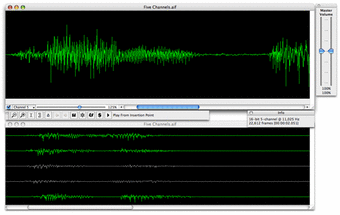
SndSampler also supports audio with more than two channels—up to 32 channels, in fact. Each channel can be manipulated independently of the others. This is accomplished through channel activation. When you apply some sort of transformation to an open sound, it is a general rule that only the active channels will be affected. You activate and deactivate a given channel using the checkbox in the lower left of the Zoom Window. Or you can use a menu command, or you can use a really cool shortcut—option-click on the channel in the waveform display and its activation state will flip. When a channel is inactive it is drawn in gray (see screen shot). Don't stay stuck in the stereo past—unleash the power of multi-channel audio with SndSampler!